Operations › Email
Introduction
Content
Using content
Plugins
Recipes
What you'll learn
How Easy CMS sends email (for password links, forms and your own hooks), how to connect SMTP, and what happens when sending fails.
Before this page: Configuration.
Easy CMS doesn't send email until you give it an email adapter in the config. The CMS uses it
for forgotten passwords and invitations, plugins such as the form builder for notifications,
and your own code with cms.sendEmail().
SMTP
@easy-cms/email-smtp sends through any SMTP server: Gmail or Google Workspace, Amazon SES,
Resend, Mailgun, Postmark, or your own.
npm install @easy-cms/email-smtppnpm add @easy-cms/email-smtpyarn add @easy-cms/email-smtpbun add @easy-cms/email-smtpimport { smtp } from '@easy-cms/email-smtp'
export default defineConfig({
// …
email: smtp({ from: 'My Site <no-reply@example.com>' }),
})SMTP_HOST=smtp.resend.com
SMTP_PORT=465
SMTP_USER=resend
SMTP_PASSWORD=re_…| Option | Default | |
|---|---|---|
host | SMTP_HOST | The SMTP server. |
port | SMTP_PORT, else 587 | |
secure | true for port 465 | TLS from the start; other ports upgrade with STARTTLS. |
user, password | SMTP_USER, SMTP_PASSWORD | |
from | SMTP_FROM | The sender when a message sets none. |
transport | — | Other nodemailer options (pooling, DKIM…). |
The settings are read when the first email is sent, so the config loads without them, e.g. in a build.
Deliverability
Send from an address on your own domain, and set up SPF, DKIM and DMARC for it with your
provider. Mail from @gmail.com addresses sent through another server usually lands in spam.
Checking the settings
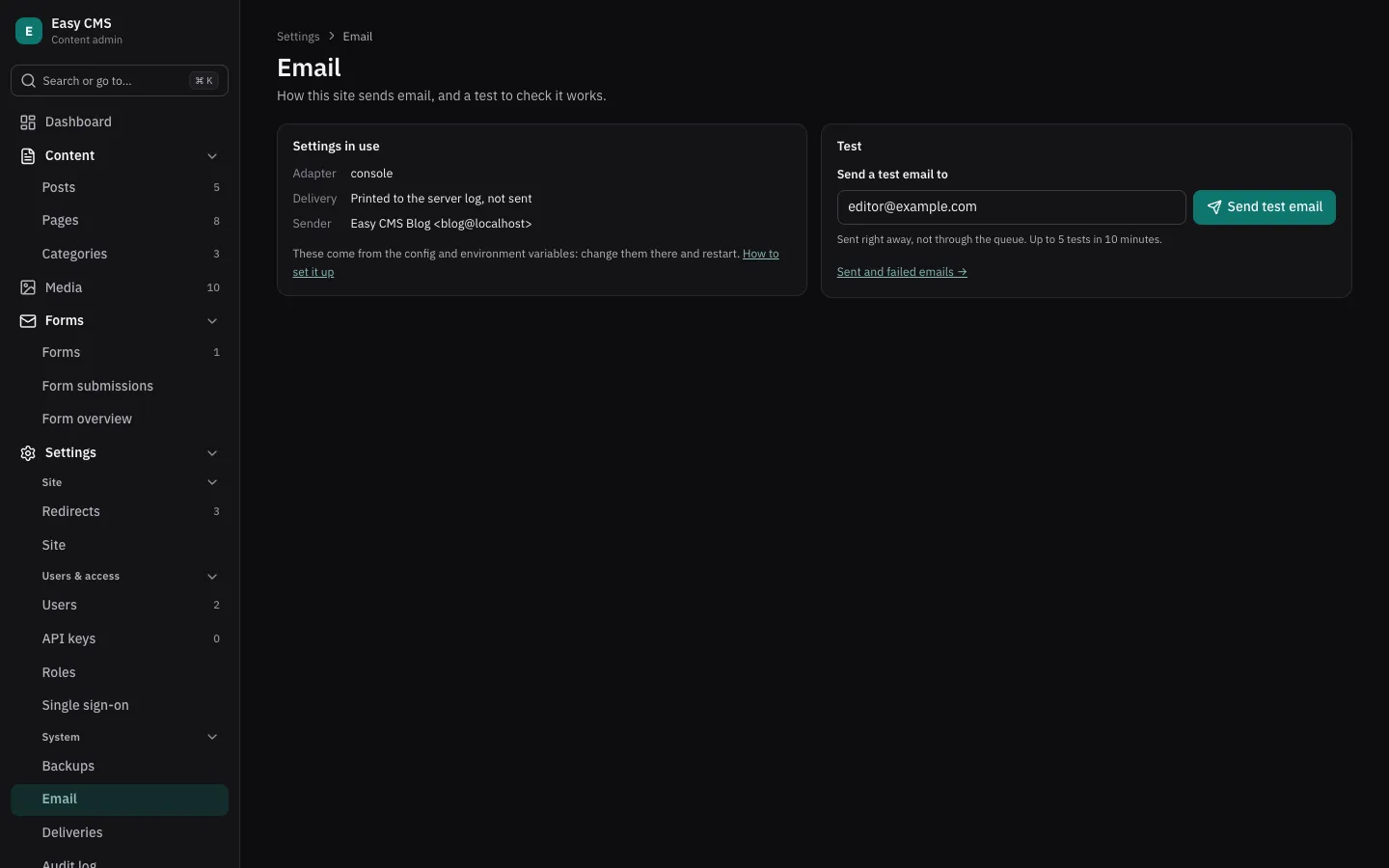
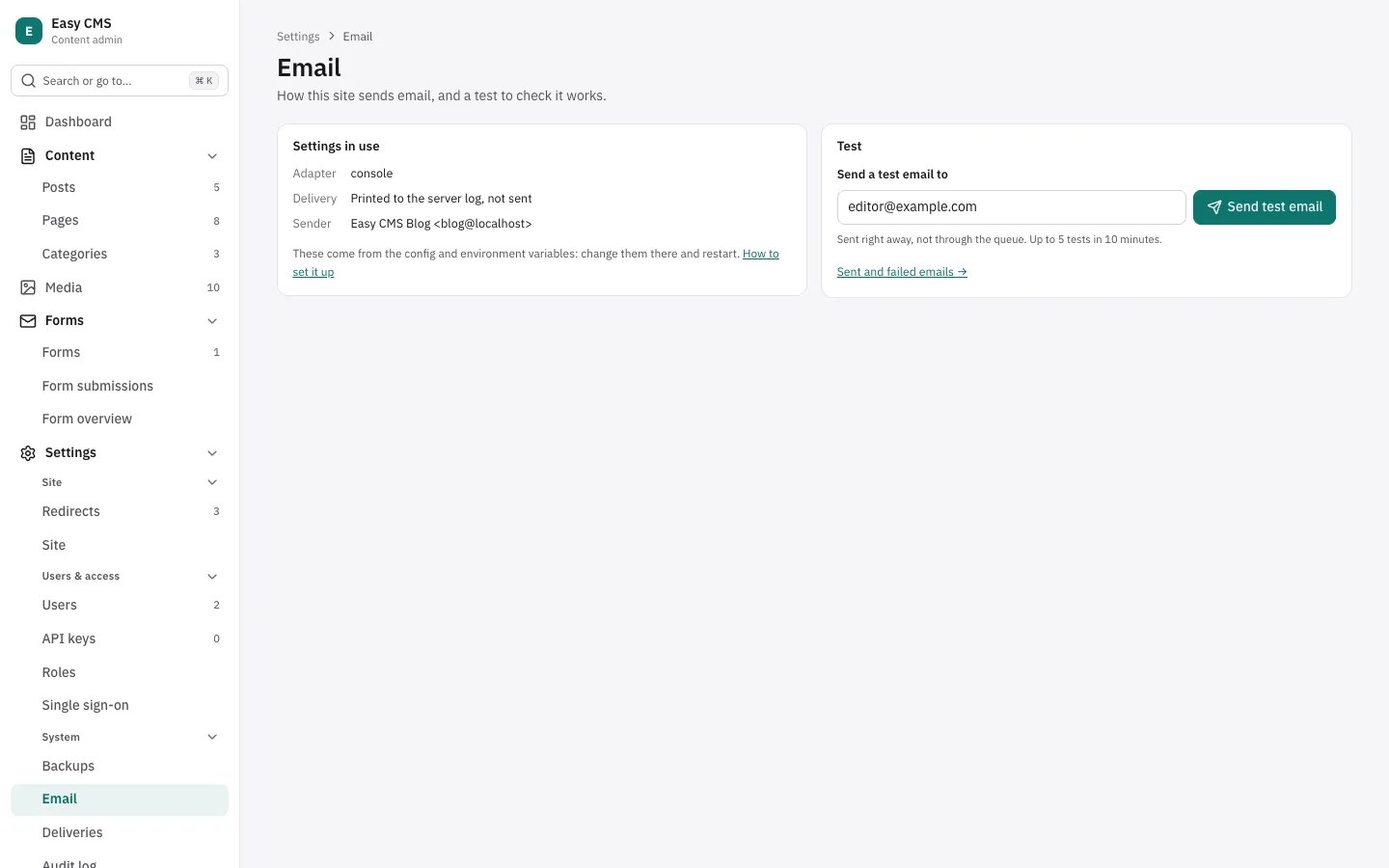
Admins find Settings → Email in the admin. It shows the adapter and the settings in use, and
where each comes from (SMTP_HOST, smtp({ from })…). Passwords only show as set or not. To
change a setting, change the environment variable or the config and restart.
- Check the connection connects and logs in to the SMTP server without sending anything.
- Send test email sends one email right away, not through the queue, to you or another address (5 in 10 minutes at most).
Both show the server's answer, with a hint for the usual mistakes: a wrong user or password
(Gmail needs an app password), the port and secure not matching (465 is TLS from the start, 587
is STARTTLS), a server that can't be reached, or a sender the server refuses.
In development
consoleEmail() prints each email in the server's log instead of sending it:
import { consoleEmail, defineConfig } from '@easy-cms/core'
import { smtp } from '@easy-cms/email-smtp'

export default defineConfig({
  email: process.env.SMTP_HOST ? smtp() : consoleEmail(),
})
Sending from your code
await cms.sendEmail({
  to: 'editor@example.com',
  subject: `New comment on ${post.title}`,
  text: comment.body,
  html: `<p>${escapeHtml(comment.body)}</p>`, // escapeHtml from @easy-cms/richtext
})to, cc and bcc take one address or a list; from and replyTo are optional. Escape
anything that comes from visitors before you put it in html.
Queued and retried
sendEmail resolves once the email is saved in the database (the internal email-deliveries
collection); it is sent in the background. When sending fails (the SMTP server is down, a
limit is reached), the email is tried again after 1 minute, then 5, 30 minutes, 2, 6 and 12
hours, and then marked failed: admins see failed emails under Settings → Deliveries and can
retry or delete them; they are deleted after 30 days. Retries run with scheduled jobs:
every minute on a long-running server, or from your cron (GET <api>/jobs/run).
On serverless hosts, call await cms.flushEmails() before the function returns, or let the cron
pick up what didn't finish.
The table is created only when email is set: add it with a migration
(easy-cms migrate:create email).
Your own adapter
An adapter is an object with send(). For example, with an HTTP API instead of SMTP:
import type { EmailAdapter } from '@easy-cms/core'

const resend: EmailAdapter = {
  // Shown to admins on the dashboard (System).
  name: 'resend',
  from: 'My Site <no-reply@example.com>',
  async send(message) {
    const response = await fetch('https://api.resend.com/emails', {
      method: 'POST',
      headers: {
        authorization: `Bearer ${process.env.RESEND_API_KEY}`,
        'content-type': 'application/json',
      },
      body: JSON.stringify({
        from: message.from,
        to: message.to,
        cc: message.cc,
        bcc: message.bcc,
        reply_to: message.replyTo,
        subject: message.subject,
        html: message.html,
        text: message.text,
      }),
    })
    // Throw to have the email retried later.
    if (!response.ok) throw new Error(`Resend answered ${response.status}`)
  },
  // Optional, for Settings → Email: what to show (never secrets) and a connection check.
  describe: () => [{ key: 'from', value: 'My Site <no-reply@example.com>' }],
  async verify() {
    const response = await fetch('https://api.resend.com/domains', {
      headers: { authorization: `Bearer ${process.env.RESEND_API_KEY}` },
    })
    if (!response.ok) throw new Error(`Resend answered ${response.status}`)
  },
}
Next steps
- Forms: notifications when someone sends a form.
- Deployment: set the SMTP variables where you host.